You are currently browsing the Randys Blog blog archives for December, 2008


Stitching Panoramas

I’ve been using Windows Live Photo Gallery for a while.  My biggest reason for using it is the Flickr Integration.  However; there are a ton of neat features I’ve discovered along the way.  One of these features is the ability to stitch photos together automatically.  I’ve used a lot of stitching programs and this is by far the easiest and the best.

The only steps needed are to 1) select the photos you wish to stitch and 2) right click and select “Create Panoramic photo…”
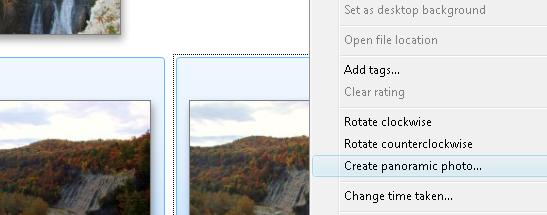
pano-tutorial

Windows Live Gallery then goes through a few steps of analyzing the photos, aligning them and finally stitching them together.

rochester-skyline-pano

Since I’ve discovered the feature I’ve created quite a few stitches. You can find most if not all of them using my panorama tag.

REMEMBER: To create a really good stitch you need to make sure the exposure settings are the same for every photo in the stitch.
Decoding Nested gz base64 code

Whenever I first install any theme, I make my own modifications.  Sometimes  it’s removing extraneous code that I won’t be using, or changing the size of certain sections, or adding in some calls that I do need.  Whenever I do this I always modify the footer to say ‘Modified by Randy Aldrich.’

Recently After modifying the theme to my liking I went to add my own footer only to find the Author had used gz compression and base64 encoding on the footer.  All I found was the following code:

eval(gzinflate(base64_decode(“rVVtb5RAEP6sif9hJEbORMCX6AfL0bTaqlGTpr7UxJgG2LljU9jF3eEQf73D2/XacDZ6foFln5nnmZldZvaj8K7nQYJLqWChNaEBz4vu3L5zOxRyBVLMnX7bmdrMcUEtcCvMnkSnmKKivIEzI4lQhQFvMnYrrPIo3C+zEpZI57FJM7lCO3NLbSlp2qf7EB4/erAH+1EYsPFA+EErypjvYPCYIKzL86uc1JQ4L3pHd5MxDDj0qRwKKUSO6ywOc700Os9HsXCIZx1/LtWFnXmPH4Ib5jJy23cwLMCDXrT1uEHXyGV2WbxjqQS8pUEVADjLhTZF52CxTbD9dKBAyjTvcSgOxClJreZOHx2mmYZ75x+PTr8cnX5zT96c8Pr9sfu9jcjpKydVWRF0VXIIfzKHigteW6dXcsDKX/z95JkDqzivcFQHyqRlkND3fSfgsrbxdKRDCgeikGqybHxKhm+Y5axn6/JwydYo11wqXdFsODHGRpMYMoOLuZMRlS+CoK5rv9ZGlAat9bVZBk50Nn6HQXzpPHJzweKrqtcoOU0pYtLGr592jGmG6cV+ZeSczdC0d//rm08f3l+hH+7pkPvZCXzKsLi8o2P+W1JIjIzVMjZCofFTXQTUeQftga5iQm+do9chfkaFEx0M6JVA/lIh4fsr5FJPKxwO6C4K2GAaK9FMKxw1CC9beBcJgaQrMy3wqsN2YV8Y/FGhSrdkcDzCu2iYWDCQbjno0wHdRWGFhrae85ce/B/89kcVGxR/1IGPvdEuerVWgicOX51pqbM1vk3F3VBhR9IK7dPnjzqRxOjaYnAhxS8v0aXHCxu4QJJynLudqRu9YxQOdQm8sNPdYGz319q+pYZ5nDTnXvoi0ZTtOdHa9CaDjdGRchEl2X5slNH9VJfNHrzkZzdOYF3QjYnQDi2LRFIteUBmusB+RnHn7K2Srv0u9MxtZ8E4NeMI7idVnu/Bia65CwpIGrixHV/rxiPFZ8vqk97/8IvDxj8O3TZwXbgvbg3xughTHLZb8Lrfa5n8MCj7Yl+WvSuP0Of9nJ25PE764T1O+dY60aLpTpxjy6Pf”)));

This was obviously an attempt to protect the author’s copyright on the theme.  However; as I heavily modified the original results, I felt the need to protect my own and so I found a solution to decode the footer.

If you run into this same problem, just place the eval code you found into a file called coded.txt.  Then all you need to do is run this decrypt.php PHP script from the same directory and decoded.txt will be created in the same directory and will contain the decoded code.

NOTE: This solution is not mine, it was found on the web at Taree Internet