The High Peaks Resort

I’ve been meaning to climb some of the Adirondack High Peaks for a few years.  Don’t get me wrong, I don’t have any grand illusions of becoming a 46er (Although, as a side note, that would be awesome).  I simply enjoy climbing the occasional mountainClimbing some of the highest peaks in New York State seems like a good goal.

highpeakshotelroomWith my parents recent purchase of a camp in South Colton, NY I figured I’d use that as a base camp.  I still probably will, although in a few weeks I’ll get to use the High Peaks Resort.  A short time ago they started running the Elevate Your Rate promotion which is basically a deal for 75% (+) off.  They’re featuring one of the High Peaks for 46 minutes for 46 days.  During that time the promotional rate will be the same as the elevation of that featured peak.  For example, our peak was Mount Emmons which has an elevation of  4,020′ which turned out to be a daily price of $40.20 which is pretty darn good.

My experience thus far has been via Twitter and I’m thoroughly Impressed.  There has been a great amount of communication from them and I’ve felt they’re really going the extra mile.  We didn’t get the dates we really wanted (due to availability) and I let them know.  They promptly look into it and got back to me within an hour with an explanation why those dates were blocked out.  They tried to see if there was any room available but unfortunately there was not.  That’s OK, the dates we got work fine anyway, and now we get to go with my friend Anthony and his wife Meg!  I really didn’t expect that kind of service at $40.20/night, and that’s just through twitter.  I’m excited to see what kind of service they offer in person.

We’re definitely looking forward to the trip.
Post 360 Activity To Twitter

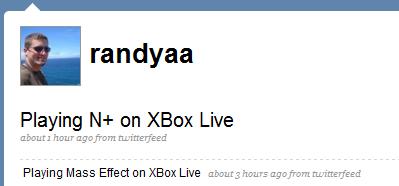
I use Twitter when I feel it’s appropriate my friends know what I’m doing.  When I’m playing a video game on my XBox 360 chances are it’s a multiplayer game and I might enjoy some company.

A few months ago Internet Duct Tape posted an article with several methods on how to obtain your XBox 360 activity.  I subscribed to their Yahoo Pipe for my gamertag.  I never really came up with any good way to use this but I finally have.  My XBox 360 activity (game activity only) now automatically updates my Twitter account.

XBox 360 Twitter Updates

To do this All I’m using is the Yahoo Pipe mentioned previously and TwitterFeed.  TwitterFeed allows you to update your Twitter status using any RSS feed and the pipe feed works just fine.

twitterfeed

Your Tweets

Ever wanted to know your Twitter trends? Well now you can generate a cloud of all your tweets using Tweet Clouds. My Cloud is below. Clearly I need to stop replying to @npike so much.

My Tweet Cloud

Now that you know the words you use most frequently, wouldn’t it be nice to know how you used them? That’s where Tweet Scan comes in handy. In fact the tag cloud Tweet Cloud gets you has links but they go nowhere (every one just links to #, I’m not sure what that’s useful for…). This following is the Tweet Scan search results for Rochester for my username only.

Tweet Scan Results for Rochester for user Randyaa

Subscribe to Feeds using TwittFeeder

RSSTwitter is a great update and notification system. You can send it messages with a variety of tools including Instant Messaging, Text Messages and the Twitter website itself. Twitter’s mission statement reads:

Twitter is a service for friends, family, and co–workers to communicate and stay connected through the exchange of quick, frequent answers to one simple question: What are you doing?

One of the most useful features about ‘new web’ is feeds. Getting updated whenever the sites you check change is probably the best enhancement to come out of the internet. No more wasting time checking sites that haven’t updated yet.

TwittFeeder asks the question: What are your favorite websites doing? It allows you to easily subscribe to feeds using twitter. Once subscribed you’ll get updates via Direct Message.

To use it first start following TwittFeeder. Once you are it will automatically start following you. When it does you can start subscribing to feeds. To do so simply send ‘subscribe http://feedurl’ to twittFeeder as a direct message. If you’re using one of the standard Twitter tools this is accomplished by sending the following message to twitter:

D twittFeeder subscribe http://feedurl

That’s it! once you’re subscribed twittFeeder will start sending you direct messages using any notification system you’ve already setup in Twitter. The great thing about this service is if twitter ever adds another notification type you automatically get your feed subscriptions sent there for free.

The notification system twittFeeder uses is whatever your notifications are currently sent to by Twitter since it simply sends you the updates via a Twitter Direct Message. If you’re not a user yet you should be but the notifications currently supported are:

  • Text Message
  • E-mail
  • Instant Messages
  • Twitter website
  • Lots and Lots of 3rd party applications

To unsubscribe to a particular feed simply send ‘unsubscribe http://feedurl’ as a Direct Message to twittFeeder.

Disclaimer: at the moment twittFeeder is scheduled to run every 10 minutes so updates won’t necessarily be immediate. That number might go up or down depending upon usage and several other factors.

Social Network Update Overload

Social Network GraphDifferent Audiences see you in different places. I use lots of different services and for different reasons. For the purpose of this post I’ll use only Twitter Facebook and my blog. The number of people that see my ‘tweets’ on Twitter is significantly less than the number of people who see my blog posts. The number of people who see my blog posts directly is significantly less than those who see my Facebook updates. For this reason I have created synchronization points.

Facebook automatically imports my blog posts whenever there’s a new one. At the same time I use TwitterSync to synchronize my twitter updates with my Facebook status. The number of people my posts reach is far greater on Facebook than it is on my blog alone. Many of my friends on Facebook are not tech savvy and therefor are not into feed reading yet. In fact many of them rely on sites like Facebook to get them updates.

You probably think (like the Technology Evangelist) that this means that the people that subscribe to all these services are suffering from Randy Aldrich information overload. If you’re subscribed to each of the 3 different services without any modifications you’re probably right.

I suffered from the same problem. Some of my friends have many services and end up duplicating their content in more than one just like I do. Unfortunately sites like Facebook do not allow you to ‘ignore imported posts’ from certain users. Until that ability exists in the services which you use I suggest making use of Yahoo Pipes.

What I did was create a Pipe that imports my Facebook notes as well as several friend’s blogs. I then use the unique operator to weed out the duplicated posts and that’s it. It is really that simple. Simply combine all the feeds you need to filter through, and utilize the unique operator to filter out the duplicates.

It's your content

If you’re on the web you’re creating something whether you like it or not. If you’re watching a youtube video, enjoying a post by Matthew Mullenweg, letting your friends know what you’re up to on facebook or just doing a search for some needed info your actions are likely recorded somewhere and this becomes part of the giant repository of information that is the Internet.

There are basically 3 types of information about you available on the Internet.

  1. Your Content. This includes things like comments on a video, Blog posts, uploaded photos and forum topics that you replied to.
  2. Your Status. Things like your away message, your facebook status and Twitter let people know what you’re up to and where you’re at.
  3. What You’re Reading. You can intentionally share what you find interesting via tools like Digg, Del.icio.us or Google Reader shared items or you can let general web trends speak for you.

Different people are probably interested in different information about you. Luckily we live in a world that includes syndication feeds. This means that if you’re interested in a person’s contributions to the Internet, and they’re savvy enough to help you, you can subscribe to ‘groups’ if Information about them.

So, If you’re interested in what I have to contribute to the Internet I’ve created the following feeds to help you.

My Content

My Status

My Shared Items