If you’ve been plagued by the following errors ever since upgrading to iOS5:
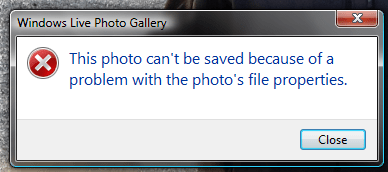

Fret no more, relief is here!
After much investigation the root cause is erroneous white-space characters in the XMP block of the image files.
The first step to fixing this problem is to
Stop taking pictures with the volume button!
No, this is not a solution but the problem seems to happen more frequently for images taken with the volume up button than images take win the shutter release on-screen button. Therefor, avoiding the volume button seems like a good idea. Next,
Fix the Images which already have the issue!
Lots of work-arounds have been posted for when you discover the problem when editing a particular image, however; the issue may surface down the road on images you have not previously edited. For me, fixing the issue only on the images I attempted to edit was not a good solution. I wanted an all-or-nothing fix.
I’ve written a small Java utility which will scan over an entire directory (or a directory of directories, or a directory of directories of directories, etc) and fix the issue on any images which have it. The full source code is available on Google Code (yes I still live in 2009, but at least it’s using mercurial). It will not touch images which do not have the issue.
Download jpegxmpxmltrimmer
As of this post the current version is 0.01 which essentially means:
It’s pre-production, pre-release, pre-beta, pre-alpha, pre-warranty, you-get-what-you-pay-for. /disclaimer
Run jpegxmpxmltrimmer
Assuming you already have a Java JRE installed, bring up a command prompt and enter the following command:
NOTE: This command will not edit existing files. This is the safe mechanism to fixing your images. Rather than fixing the originals, it makes copies and fixes the copies (named appropriately).
java -jar <path-to-downloaded-jpegxmpxmltrimmer.jar> <path-to-root-directory-of-images>
If you would like to fix the error by editing the existing files simply add a true at the end of the commandline.
That’s it. You’ve now fixed the issue! Yay! <insert-mini-celebration-here/>
The Catch
You’ve fixed the images with the pre-existing issue, but the bug still exists in the latest release of iOS (5.1 as of this post).
For now, you’ll have to run the utility over any files you import. I’ve still found the issue on a few photos I’ve imported even since I stopped using the volume button.
I’ve reported the issue to Apple but haven’t yet heard back. If you want this issue fixed permanently I suggest you do the same:
- Submit an Apple RADAR
- Apple Product Feedback
- Call Apple Care at 1-800-APL-CARE


 Randy Aldrich