For the geek in all of us, easily the best periodic table ever created is the Dynamic Periodic Table.

For the geek in all of us, easily the best periodic table ever created is the Dynamic Periodic Table.
It’s taken me over a month to write this.
It should be awesome then!
Nah sorry, just more of the same old crap.
In Syncing with Foldershare part 1 I outlined what I was using FolderShare for. I’ll now outline my reactions after using the service for a while.
FolderShare advertises three main features. Sync My Folders, Share With Friends, Access My Files.

Share With Friends – This feature is completely unnecessary. There are literally thousands of ways out there to share a file with your friends. Having a directory synchronized with your friends seems like overkill. As far as the collaborative nature of the feature, collaboration itself belongs on the web. As such there are many online tools such as Google Documents or gliffy provide much better mechanisms for collaborating with others.
Access My Files – This feature scares the crap out of me and if if there is one reason I stop using FolderShare this will be it. It allows you to access every file on any of your computers that is currently connected to FolderShare. This means if someone gains access to your FolderShare account they can access everything from the web.
Surely you mean only the files or directories you’ve told FolderShare to share?
Nope sorry, Everything. A big downside to FolderShare in my mind is the fact everything is configured from their website. You can add a new computer to ‘sync’ with and add sync points right from the website if you have access to the account.
Sync My Folders – This is the only feature I find useful and frankly the only feature I want FolderShare to provide. This allows you to pick (different) folders on two (or more) different computers and sync their contents over the web. They synchronization is recursive so if you have seperate partitions for data feel free to sync the entire partition.
FireFox profiles -Firefox keeps some files in your profile locked whenever it’s running. If you have the (synchronized) profile open on more than one computer you will start to get notices that FolderShare cannot copy a certain file. Your only options are ‘retry’ or ‘exit.’ If you choose retry it will obviously fail unless you close FireFox. Choosing to close firefox means you will need to wait several minutes before resuming your work. If you choose exit FolderShare itself exits and you lose your synchronization completely. This didn’t bother me to much I just got in the habit of making sure I closed FireFox on my laptop before attempting to use it on my PC.
After a few weeks however; my PC and Laptop started to get out of sync and at some point Firefox (or Windows I’m not sure which) decided it would be a good idea to reinitialize my entire profile and I lost everything on my laptop. At this time I determined the headaches FolderShare was giving me synchronizing Firefox profiles wasn’t going to work for me. I need a new solution so if someone has one please share. Note that I’m looking for a way to synchronize everything including plug-ins not just settings and history (what Google can currently offer)
iTunes Music Library – As I don’t use iTunes all that often on my home PC this feature is working excellently. However; it suffers the same problems as the Firefox profile synchronization in that the two PCs cannot both run iTunes at the same time.
Security – FolderShare uses your normal Microsoft login. This means that if your MSN account is compromised it instantly exposes all of your personal files on your home computer. This is very scary to me. To make me a bit more at ease FolderShare needs to add some local security features.
Usefulness – FolderShare seems to be incredibly useful to synchronize data. That being said it seems fundamentally flawed for synchronizing application data that needs to be used very often. The fact that FolderShare synchronizes over the internet as opposed to network connectivity is awesome. This means that even if I’m on the go, when I make a change to a file I’m synchronizing it gets backed up at home.
Florida will once again be the cause of a lawsuit dealing with the election. Good job Florida way to screw it up again!
The following video is a clip from The Daily Show which contains an animation of Florida and Michigan that I felt I had to share. The rest of the clip is also worth a look if you like Jon Stewart.
http://www.thedailyshow.com/sitewide/video_player/view/default/swf.jhtml
My first cousin once removed Theron Cota was once a published poet. He was not very well known, in fact probably not known at all outside of Canton/Pierrpont. However; I do know that the following poem (written in 1932 while Franklin D Roosevelt was running for President) was published in the local Canton newspaper in 1980:
A Farmer’s Thought
I am no politician, am glad to say
I earn my bread in an honest way
I have a job with little pay
Thousands of others in the same way,
Have many debts with no money to pay.
I have no pull in the political ring,
Just the same I can whistle and sing.Franklin says he will give us beer,
What will he do with all that’s here?
Our leaders will smile and grasp our hand,
Promise everything good that’s in our land;
All they want is our ignorant votes
They know darn well we’re billy goats.They sit and smoke in an easy chair,
I will not mention Senator Thayer.
I cannot read or make a speech.
Those that can are hard to reach.
But after all is said and done,
Their pockets full of worn out fun,
We have both parties on the run.Canton, NY
This resonates with my software development experience. If you’re involved in the industry it probably resonates with you as well.

Every time this commercial comes on TV and I’m within 50 feet of Rachel she hits my arm and tells me to watch. I’m not joking, every time. I’m hoping that maybe if I share it here and admit that ‘yes dear its cute’ she’ll let my shoulder recover.
In case you live under a rock the Giants won the Superbowl tonight in what could be called the greatest Superbowl of all time. An 83 yard drive to win it in the last 3 minutes of the fourth quarter. A few (12) Phenomenal plays by Eli Manning brought him home to mamma as the second brother in as many years with the trophy and the MVP award. Mamma must be proud, the Giants fans sure are. Final Score 17 to 14 Giants. Way to ruin a perfect 18 in 0 season Patriots.
If you tuned out during the commercials this year, or were hitting the keg, don’t worry you didn’t miss much. Well, except this little gem by Doritos:
http://www.hulu.com/embed/u-JoydCJbqS8Uuh2WnDxyQ
For those of you who have been following Kina Grannis (or any of the other contestants) in the Crash The SuperBowl contest, She Won! I’m happy for her. From unknown to household name in only a few weeks thanks to her Two Weeks for Kina campaign. Her Superbowl spot is below:
My friend Emily E-mailed this to me and I figured I’d share it here.
The car pictured in this note is a Mercedes Maybach. Notice the ‘recliner’ rear seats and the ‘electrostatic’ sunroof. The sunroof turns from opaque to crystal clear depending on the passengers preference.

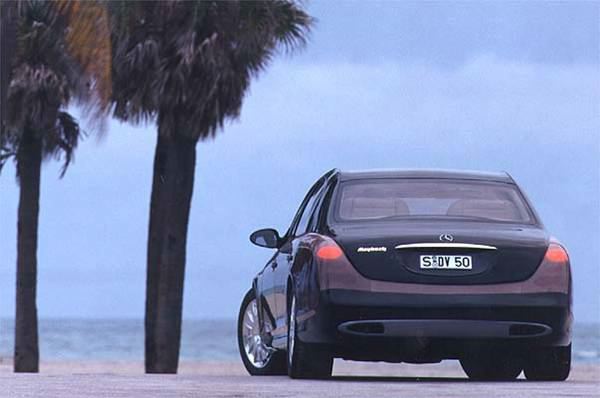
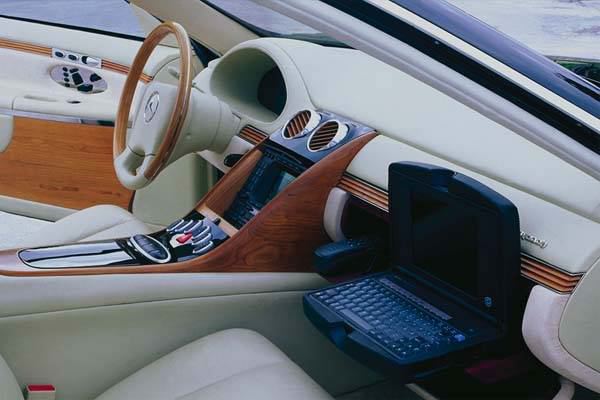


NOW, STOP DREAMING AND GET BACK TO WORK! (BE HAPPY WITH WHAT YOU’VE GOT)!

 If you use more than one PC on a regular basis you know how much of a nightmare it is to manually keep everything in sync. Using primarily web tools helps greatly in that respect but it doesn’t solve everything. Whatever the solution you chose you want it to be automatic and simple. I’ve been using FolderShare to keep my laptop and home PC in sync for about a month now and I finally feel I can share the ins and outs I’ve discovered along the way.
This will be a two part post and first I’d like to describe what I’m currently syncing and why, as well as what my future plans for FolderShare are.
 What I’m currently syncing:
My future plans are:
That’s it for my current uses and future plans. Stay tuned for my next post regarding my lessons learned about FolderShare.
I haven’t been able to try it out yet but the new Canon XSi looks to be a nice upgrade from the Xti. The enhancement to 12mp and the move to SD media alone is worth it, not to mention the other enhancements.

Maybe this will be my first step into the world of DSLRs instead of the 40D I want so badly? We’ll see, although at this point I think I’d outgrow the XSi much too quickly to warrant the purchase now instead of waiting a little longer to purchase the one I really want (the 40D).
Details below to save you the jump.
 Randy Aldrich