Get Your Money Back with PriceProtectr!

Price Protectr LogoPrice Protectr turned 1 this December. I didn’t even know they existed until 2 weeks ago, I wonder how much money I could have saved if I did?

Price Protectr is as simple as it gets. Their claim is to save you money by helping you take advantage of online retailers price protection guarantee. In their words:

Sit back and relax. If we notice the price drop any time within the price protection period, we’ll send an email your way (and we’ll keep sending them if the price keeps dropping).

To use their service all you do is fill in the URL to the item you purchased. They then give you it’s title & current price. They assume you are buying it at that price and that you bought it today, but if not you can change both values. Once you’re finished setting up the item you simply fill in your E-mail address and click the protect me button. You’ll get a confirmation E-mail and then anytime the price drops you’ll get notified via E-mail as well.

There is no requirement to create an account, however if you wish to, creating an account gives you a few additional features such as tracking all of your savings.

At launch they only had 6 retailers. I’m not sure which ones, but I would guess sites such as amazon and buy.com topped their list at the time. Now they have over 70 different retailers listed and it’s still growing!

Consumers, don’t fret! Buy that IPod Nano or that PS3. Stop worrying about whether the price will drop in another few weeks or not and buy it now! Price Protectr is here to save the day!

Retailers probably love this because it will mean more people will throw caution to the wind and buy it now! I wouldn’t be surprised sometime in the future to see Price Protectr partnering with retailers and advertising in their stores.

What concerns me with Price Protectr is a question that often accompanies these web applications. How do they make money? It doesn’t seem like there’s any kind of a business model for them to turn a profit so will they last? Who knows, but I’m sure to take advantage while they’re here.

Send a Kwiry From Your Cellphone

Kwiry Text LogoI hear and see things I want to remember all the time. I used the voice notes on my phone for a while but I always seemed to forget they were there. A few weeks ago I was thinking it would be great to be able to send a text message to store little things I think of throughout the day. I even tried writing an application that allows you to send text messages to Google Notebook. Unfortunately Google’s Data API doesn’t allow pushing data to Google Notebook so that was a bust.

A few days ago I found Kwiry which does exactly what I was looking for. Kwiry allows you to send a text message which is saved as a ‘kwiry’ (pronounced query) on their system. It then sends you a notification using any method you’d like including E-mail, SMS, RSS etc that you have a new saved kwiry. There is also a social aspect so you can see your friend’s kwiry’s and they can see yours. I find this feature completely useless and unwanted so I’ve disabled it by setting all my kwiry’s as private. Social networking doesn’t improve everything. Social networking is not a golden hammer even though most new services think it is.

Kwiry stores your texts in their system. Once they’re stored and you get notified (using whatever method you prefer) the links they provide send you to the Kwiry website itself which then gives you search results using your desired search engine.

I love Kwiry and it’s functionality but I’d much rather use it without logging into their system since the functionality it provides is really quite simple. To do this I’ve created a Yahoo Pipe that switches the links to point directly to the search engine of your choice. All you need is the base Search URL (Google’s would be http://google.com/search?q=) and the feed URL to your kwiry’s.

Use this Pipe to replace the links in your kwiry feed to your desired search engine.

Web Visio Clone : Gliffy

Gliffy LogoI’ve slowly started moving to online document management using Google Documents. Unfortunately they lack a Diagram utility (like visio) of any kind and so I went searching for one. Luckily enough the people at Gliffy agree. The Web is a perfect platform for such a collaborative sort of document like the diagrams you can create with Visio. At this point in time they don’t support the ability to import Visio or other Diagram type documents, but just the ability to use an online tool to build diagrams so that they can be shared and collaborated on is awesome.

Gliffy also allows the diagrams to be embedded anywhere on the web as long as they’re public. You can also get many different sizes including a thumbnail version. Private documents are provided as well but that requires a paid subscription to their service.

The service itself is very responsive and in fact allows building diagrams much quicker than doing so in clunky bloated client side applications such as Visio. As with any web application one of the key benefits is also that your created document is available anywhere and no client-side software is needed. An example I threw together quickly is below.

File UML Diagram

Youtube Subscriptions via RSS

YouTube Subscription FeedYou’re probably aware of the subscriptions feature in YouTube. It allows you to ‘subscribe’ to users (or channels) who’s videos you enjoy. This means when you sign into YouTube you’ll get a list of videos updated by the users or channels you’re subscribed to.

This is great but unfortunately YouTube doesn’t provide any other subscription update notification systems besides logging into the site itself. For someone like me who doesn’t like to visit sites without a particular goal in mind this is annoying to say the least. I’d much rather know there is a new video I care about before visiting YouTube.

At first I thought YouTube simply didn’t support syndication of any kind. However; with a little bit of searching I found they have a whole list of different types of RSS feeds that are available. You can create an RSS feed for anything from a ‘tag search’ to the ‘Top Rated videos.’ They don’t yet have a way to create an RSS feed of your subscriptions. That’s where I come in.

I’ve used Yahoo Pipes to do things in the past but most of them were very custom and not usable to anyone but myself without quite a bit of effort. This time around I thought I’d make one that’s parameterizable to allow anyone to build an RSS feed of their subscriptions. I have created a pipe that does just that. You simply provide your username and the number of videos you want displayed in the feed. The Pipe does the rest and you can subscribe to it using any feed reader you’d like.

I’ve published it on Yahoo Pipes public page and you can now use it as well. So check it out and let me know what you think!

Zamzar Converts Your Files

Zamzar LogoA few days ago a friend asked me how to embed YouTube videos into a powerpoint presentation. I assumed it wasn’t possible but I went searching anyway. I didn’t come away with a miracle but I did come away with a new tool for my arsenal. Zamzar will convert any that you either upload or send it a URL to. Zamzar is also smart enough to convert embedded items such as YouTube and MetaCafe videos. They have a whole slew of other sites that are supported in a similar fashion. Don’t think Zamzar is just for videos though. Oh no, they support word processing conversion, compression type conversions, image conversions, video conversions and music conversions.

Zamzar is your one stop shop to convert your files.

The way it works is really quite simple and eloquent. You fill out the from on their main page (shown below), click ‘convert’ and wait for the E-mail. The E-mail will contain a link to the downloadable converted file(accessible by anyone who has the link, so feel free to forward it to friends or whatever).

Zamzar Convert Form

Be careful the converted file is only available for 24hrs. That’s probably how they keep their costs low. If you’re interested in storing your converted files on their system, they do have pay plans available with pricing for just about everyone.

Disclaimer: Like everything these days, the service is in ‘Beta’ and as such it might come with a few bugs. I also know the site has some pop-up ads so don’t turn off your pop-up blocker.

Goodmorning from Hulu

I finally got into the Beta at Hulu last week. I am very excited about the service which, if you’re not aware, is a new web video service that offers network video content over the internet. It’s free of charge, developed by the big networks and is ad supported just like regular network television. The reason I’m excited about this service is that it’s one step closer to the video entertainment of tomorrow.

The future of TV will be an on demand service. You watch what you want to watch when you want to watch it. Some people might say we’re already there with DVR’s. I say no, a DVR is nothing more than a carry over from old video tape technology and thought process. Sooner or later all your television will be streamed over the internet directly to your TV and that means you can select the specific show and episodes you want to watch (or even categories or tags if you so desire) rather than channels which sometimes have shows you want to watch on but mostly just have garbage.

Removing the need for a person to know what they want to watch before they watch it is a huge benefit of streaming. You can go back weeks, months or even years to get back to the beginning and watch all the episodes of a particular show. It also opens up the door to a feed system similar to RSS in which you get notified when a new episode is available so you can have a list of shows in your queue. Another benefit is the space limitation is now gone you stream the video when you want to watch it as opposed to watching it from your own local copy.

I can’t wait for the day that all movies are available online on demand. I’d love to have a paid premium service that removes the ads. I’m hoping that Hulu will add a premium service eventually that removes the ads all together for a nominal fee. If they were to do that and build the content into Media Center or some other interface that is easily adapted to the television then I would immediately switch over to paying for the service and drop Cable all together.

Thus far my only complaints for the Hulu service deal with their interface. The idea is solid but their UI needs a little bit of work. For starters I’d like to see playlists that contain entire seasons of episodes. I’d also like to see feeds that contain only the episodes of the subscribed show not video clips.

One really neat and brand new feature built into Hulu is the ability to select portions of a video to share. I’ve selected a fitting section of the latest Family Guy to demonstrate below:

http://www.hulu.com/embed/ItwmCm9zM1JbyFheEsAehUCwRB8IH2-v

All in all I think the cable and satellite companies have some new competition and if they don’t adapt quickly they might be in trouble. If I were Time Warner I’d be working on ways to getting online versions of the same content to my subscribers as quickly as possible.

Bee Movie

We finally saw Bee Movie the other day and it was quite funny. I rather enjoyed listening to Matthew Broderick and Jerry Seinfeld fight over the plights of life as a bee. The cast was impressive, From Sting to Larry King and Chris Rock. Even though the movie poked fun at the situation, it was interesting to think about how much bees really are needed. Granted lots of other critters pollinate, and the wind even plays its part, but I’d be willing to bet that a majority of pollination happens thanks to our little yellow (and black) friends. What would the world look like without pollination? Rachel would be out of a job (she’s a florist remember?) for sure.

If you haven’t already seen it, take a look at the trailer below, and if you enjoy animated movies like Shrek and Ice Age I’d suggest watching Bee Movie.

Bee Movie Trailer

Yelp for Rochester

Yelp LogoA true Web service is only as good as it’s users make it. I just recently discovered Yelp and luckily they have a Rochester page. I have recently been trying to find a website that lists local restaurants along with ratings. Yahoo and Google business results return too many chains that aren’t of interest to me since they’re available anywhere. I’ve been looking for results that are more locally oriented such as the listings found within a Frommer’s guide.
Fortunately Yelp provides everything I’m looking for in restaurants and even has lots of extra categories such as Night Life, Beauty and Spas and Shopping. I was interested to find they also have a list of romantic restaurants which is always difficult to find in Rochester. In order of highest ratings these are the following Rochester romantic restaurants on Yelp:

  1. Rooney’s
  2. Oasis Mediterranean Bistro
  3. Tapas 177
  4. Lucano Ristorante
  5. 2 Vine
  6. Max of Eastman Place

The only one of these that Rachel and I have been to is Tapas (which was excellent and I’ll be sure to rate it thus). We haven’t even heard of any of the others. There are a few missing from this list, like the Triphammer Grill, that we have been to but it’s always great to find new ones.

If you’re looking for new restaurants or shops to check out, look no further than Yelp.

Melted Banana Hand – Rocking out with Rock Band

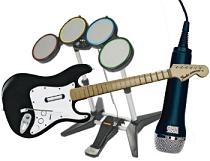
Rock BandWhen Rock Band came out a few weeks ago I was excited to try it out. Luckily my good friend Brian bought it and invited me to try it out. Ever since we’ve been meeting once a week as Melted Banana Hand. My impressions?

It’s more of a game than any of the Guitar Hero’s. Rather than a playing a list of songs and then being done, the idea is that you tour as a band. You will end up playing the same songs more than once but that’s ok because of how it’s done. Instead of finishing a song, your objectives are finishing a set list or finishing a venue. Because of the structure of the game it is also able to incorporate downloaded songs into the game itself rather than just adding it to a list of playable songs in quick play mode like in Guitar Hero.

The Guitar is only O-K. It looks great and I love the addition of the lower fret buttons I just wish they were used more. The game doesn’t force you to use them it simply increases the bonus you get when applicable. It would add even more depth to the game if it were to force you to use the lower frets during solos.

Solos are new to the game. For guitar this simply means added points and most likely faster sections with more notes. For drums this means you can play anything you’d like, which means a lot of fun. For vocals you can say anything you’d like. The solos in the game create a new and very dynamic musical environment.

The drums are impossibly hard. The guitar in Guitar Hero wasn’t easy to begin with but with some practice it got much better and was completely playable on hard. The drums on Rock Band are a completely different story. It’s hard on easy and insanely impossible on medium. Anything beyond that is just crazy talk.

Melted Banana Hand is still meeting once a week and the vocals are always up for grabs considering my friend Brian and I can’t at all. If you’re interested just let me know and I’m sure we can find a spot for you.

The 2 Billionth Flickr Photo

It’s interesting to see the 1st or a significant nth item posted to any service. So often though they turn out like the first youtube video. A waste of space. It’s nice to see when a milestone is actually something worthwhile. That’s the case with the 2 billionth flickr photo. It was posted a while ago I just haven’t had the chance to post it yet. Here it is:

Originally uploaded by yukesmooks Just in case you were wondering how to find the Nth Flickr photo simply use the following:

http://flickr.com/photo.gne?id=XXXXXX

Simply replace the X’s with the photo number you want to take a look at.