For the geek in all of us, easily the best periodic table ever created is the Dynamic Periodic Table.

For the geek in all of us, easily the best periodic table ever created is the Dynamic Periodic Table.
Florida will once again be the cause of a lawsuit dealing with the election. Good job Florida way to screw it up again!
The following video is a clip from The Daily Show which contains an animation of Florida and Michigan that I felt I had to share. The rest of the clip is also worth a look if you like Jon Stewart.
http://www.thedailyshow.com/sitewide/video_player/view/default/swf.jhtml
This resonates with my software development experience. If you’re involved in the industry it probably resonates with you as well.

In case you live under a rock the Giants won the Superbowl tonight in what could be called the greatest Superbowl of all time. An 83 yard drive to win it in the last 3 minutes of the fourth quarter. A few (12) Phenomenal plays by Eli Manning brought him home to mamma as the second brother in as many years with the trophy and the MVP award. Mamma must be proud, the Giants fans sure are. Final Score 17 to 14 Giants. Way to ruin a perfect 18 in 0 season Patriots.
If you tuned out during the commercials this year, or were hitting the keg, don’t worry you didn’t miss much. Well, except this little gem by Doritos:
http://www.hulu.com/embed/u-JoydCJbqS8Uuh2WnDxyQ
For those of you who have been following Kina Grannis (or any of the other contestants) in the Crash The SuperBowl contest, She Won! I’m happy for her. From unknown to household name in only a few weeks thanks to her Two Weeks for Kina campaign. Her Superbowl spot is below:
My friend Emily E-mailed this to me and I figured I’d share it here.
The car pictured in this note is a Mercedes Maybach. Notice the ‘recliner’ rear seats and the ‘electrostatic’ sunroof. The sunroof turns from opaque to crystal clear depending on the passengers preference.

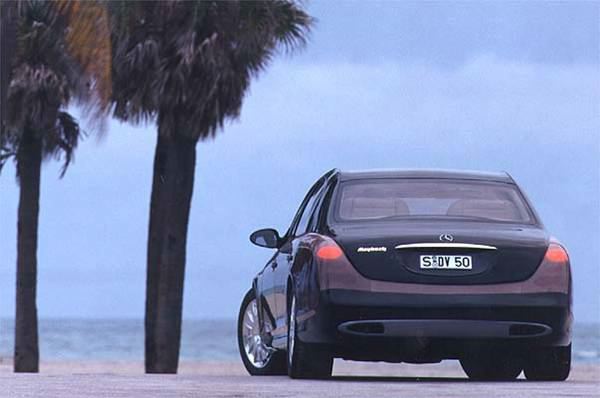
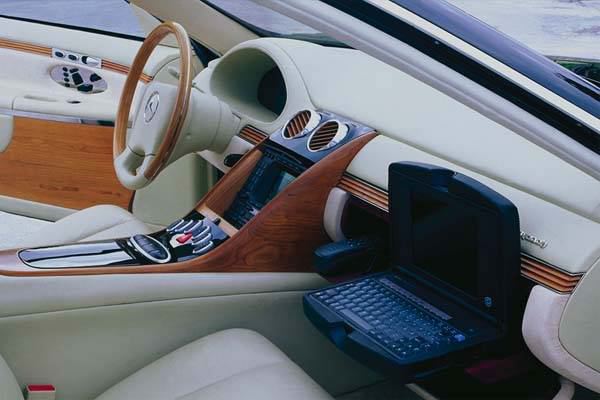


NOW, STOP DREAMING AND GET BACK TO WORK! (BE HAPPY WITH WHAT YOU’VE GOT)!

 Planning a trip? Yapta can in two big ways.
Something you probably didn’t know about most airlines is many offer reimbursements for price drops on air flights. The old saying that everyone on your flight paid a different price no longer applies. Everyone can pay the same price if you’re using Yapta!
Direct from Yapta’s FAQ here’s a list of some of the vouchers and refunds available:
| Each airline has a different set of rules and regulations. However, here is a quick look at the policies for each airline. Click each of the airlines for the specifics. |
| Airline | How much it will cost to get a travel voucher? | How much it will cost to get a “cash refund” for a non-refundable ticket? |
|---|---|---|
| AirTran | $75.00 | Not Offered |
| Alaska | Free | $50.00 |
| American | $100.00 | Not Offered |
| ATA | $60.00 Domestic $100.00 Hawaii |
Not Offered |
| Continental | $100.00 | Not Offered |
| Delta | $75.00 | Not Offered |
| Frontier | $100.00 | Not Offered |
| JetBlue | $40.00 | Not Offered |
| Midwest | Free within 7 days of purchase $100.00 after 7 days |
Not Offered |
| United | Free | $100.00 |
| US Airways / America West | $100.00 | Not Offered |
Rachel and I saw Cloverfield on Friday. It wasn’t planned, in fact I didn’t have a whole lot of desire to see it at least not until I heard everyone’s reaction. That being said my friend Brian called and begged us to go (read: asked if I want to see it) so naturally I didn’t want to disappoint.
Cloverfield was awesome. I thought the hand held cameras would distract you from the storyline and takeaway from the overall movie. It had the exact opposite effect. The movie simply couldn’t have worked as a regularly filmed movie, at least not successfully. The reason it worked so well is the home movie added a very personal touch. In the beginning you laughed with the characters and in the end you cried with them all because you felt you were watching your best friend’s Youtube video. The movie also portrays our current generations desire to document everything and J. J. Abrams doesn’t hide that this was part of his motivation for the movie style.
I haven’t been a fan of a movie’s ending in quite a while but Cloverfield’s ending is the only way I can imagine it. That’s not to say it doesn’t leave you with a sense of ‘WTF’ and ‘damn I hope they don’t make a sequal’ but it works regardless.
If you haven’t seen the trailer I’ve embedded it for your viewing pleasure below.
[ifilm]2913955[/ifilm]
 It’s been said before but I’ll say it again. Blueray and HD-DVD have lost and the media wars don’t matter. I thought it was going to take a lot longer than this but Streaming HD content is here. Enter the new and improved (and cheaper) Apple TV. Every Tech Blog in the world is making announcements from MacWorld 2008 and the most important announcement isn’t really the new streaming rentals, iPhone update, Time Capsule or even the new MacBook Air. The most important announcement is their Apple TV Take 2. They even admitted their first version was a failure. That’s a big step for a company like apple.
Rent High Definition Movies Directly from Your Widescreen…rent movies from a catalog of over 1,000 titles by the end of February, including over 100 titles in stunning high definition video with 5.1 Dolby Digital surround sound, with no computer required.
That’s it. Move over Blueray and HD-DVD, Your days are numbered. With the new ability to forgo the computer and rent or buy directly from your living room at a price point lower than most Blueray or HD-DVD players out at the moment why would you do anything else?
Apple is definitely a forward looking company and I’m glad they’re making the push for streaming media. My only wish is that they’d realize that some people would rather pay for a subscription service than pay per use.
I’m a fan of Google Reader. I’ve written here before about their new improvements and how great it is to work in an iterative development area where improvements happen daily.
Even a great team has a failure once and a while. They recently added the ability to see your Google Talk Friend’s shared items within Google Reader. While this shows that Google has great plans for integrating their services, I’ve had problems with this feature right off the bat and from what I understand I’m not the only one.
My biggest problem was that the counter of unread items would go up but my ability to read said items was gone. I could no longer get updates of my friend’s shared items essentially rendering the feature useless. If you’re like me you’ve been plagued by the following screen since they introduced the feature:

Thanks to Graham the helpful Google Reader Guide we now have a solution and it’s easier than you think.

At this point you will have their new shared items displayed. From now on things will act normally and you can mark the items as read as you see fit.
These instructions are a complete interpretation of Graham the helpful Google Reader Guide’s original post.
Our blog hasn’t had much cheer
It’s such a busy time of year
Now its time for a toast
with those you love most
So raise your glass to a Happy New Year
 Randy Aldrich