Cosmological Fantasia – Wonders of the Universe

In keeping with the theme of late, I thought I’d share a video made by BDH posted by NASA on their Astronomy Picture of the Day website. Unfortunately BDH has removed the video, but the internet being what it is… I found it again. Side note, if you don’t subscribe to their Astronomy Picture of the Day, you should.

http://www.dailymotion.com/swf/video/xiawlw
Cosmological Fantasia by ceticismo-net

It’s my firm belief that if NASA wants to drum up interest in their program and get enough funding to do some really cool stuff, they need to be producing real videos like this all the time. Nothing would get people more excited about space again than some fantastic HD quality video of our solar system and beyond.

Delilah Video Post

With the little one growing and exploring more and more every day videos are a ton of fun to watch and create now.  These are some of the ones I’ve made (all on my iPhone using iMovie) that sort of show her progression. I try to keep them short and to the point so they’re all under 1 minute (& most are under 30 seconds). The embedded Youtube player is a playlist, so I’ll keep adding to it as I upload more videos.

At the time of the creation of this post there are 6 videos to watch in the playlist.

The Kodak Picture Saver Scanning System

I’ve been caught in a physical photo archival project for the better part of 5 years.  Yesterday my friend Matt shared a post on the Monroe County Library System‘s website that stated they are currently running a test of the Kodak Picture Saver Scanning System for patrons for free.  I decided I’d take the opportunity to test it out and scan a bunch of my photos in the process.

I used the Kodak Picture Saver Scanning System for the first time today and thought I’d share some of my thoughts before I forgot.

Pros:

  • Speed.  I processed roughly 300 photos (including proper rotation) in under 30 minutes.
  • Simplicity.  Drop the photos in and press ‘scan’ and let ‘er rip.
  • Stores to Flash media.  No need to wait for CD authoring.  flash media storage is a breeze.
  • Free.  Need I say more?
  • Albums.  It can create albums (or folders) on your flash media based on how you group the photos
  • Constant scanning.  Even though it can only handle 25 at a time, this limitation is just in the ‘tray’.  You can keep dropping photos into the tray and because it scans the back photos first, things stay in order and it can just keep chugging along.
  • Good-Enough photo quality.  It’s not fantastic but it’s good enough.  If you want spectacular scans you really need to go back to negatives and scan those, which requires a great deal more time and work.

Cons:

  • Works best when photos are in a big row/group.  This requires a ton of up front time before you use the device.  As a result total time savings is tough to calculate.
  • The tray where the photos drop into is not low enough.  The tray slopes down and away from the scanner and as a result sometimes the photos get stuck and you need to move them out of the way or the next photo will go underneath the current photo causing archival ordering problems.  This could easily be avoided simply by increasing the vertical distance from the scanner to the tray
  • The pricing.  Right now it’s free, but it’s very apparent from the Interface that Kodak intends to charge a hefty premium for the service.  At ‘checkout’ you get a breakdown of how many photos you scanned (at what price each) how many photos you applied some special photo editing to, how many you sharpened etc.  Each line has a price associated with it which right now reads $0.00 but this is obviously going to change.
  • Photos are stored to the device first.  This makes sense because of the apparent pricing model but means if a problem arises before you’ve ‘checked out’ it’s possible you could lose all the work you’ve done.
  • Price.  Dear lord the unit is expensive.  This makes sense I guess considering they’re targeting small businesses to put these in rather than consumers.  But For projects like mine, something like this as a consumer device would be excellent.
  • Very old Photos.  Some styles of old photo prints require one by one photo feeding because of the style and texture of the border.
  • Wallet sized prints.  Although the scanner can handle them, the wallet sized photos need to be placed off center to get gripped by the auto-feed rollers.  Also, the resolution when scanning a wallet size photo is too small to be of much use.

The women I talked to at the library seemed to think the User Interface needed some work because many people had been confused by the terms “Next” on basically every screen.  Her exact comment was “next what?”  This seemed sort of silly to me but could also be fixed very easily simply by using terms like “I’m done scanning” or “save photos” instead.  Since there’s been so many complaints this is probably something they should address even if they (like I) think it’s silly.

In Summary:

It might look like there are more cons than pros, but really, it’s an excellent system and the cons I’ve listed are all very nitpicky.  The biggest downfall of the system as I see it is price, and if you act now you’ll get what you need for free.  Don’t think for a second my love for the system has anything to do with my local proximity to the business.  If you remember… the only previous time I’ve written about a Kodak product, I wasn’t too gentle.  Maybe they’ve found a new niche they’re good at?  I don’t know, but I’ll tell you what…

I’ll be making another appointment tomorrow and I will be be going back as often as I can until I finish scanning my photos.

Timelapse Junkie

I’m a timelapse junkie.  I like creating them, I like watching them, I find (good ones) absolutely stunning.  Not sure when this started but it is what it is.

Recently I’ve noticed a whole slew of them popping up on the ‘tubes and I thought I’d share a few of the good ones.   You’ve probably seen at least one or two of them.   I can watch them all over and over again though, and I’d bet I”m not the only one.

Rochester NY Winter Timelapse by Rochester’s own Mindrelic Photography:

NYC by the same artist:

The Aurora by TSO Photography:

Le Flâneur by Luke Shepard


0 going on 16

IMG_7883We went to the Sandbox yesterday for a friends birthday. Lilah got to play with a lot of new toys and her favorites were the ride-on types. Besides a dragon and a goose, the laundry basket and an empty box or two it was the first time she’s played with one.

Last night we were tooling around in Wal-Mart and, while I’m generally opposed to buying stuff like this in a brick and mortar store (without a coupon), we happened upon one of the carts that Lilah really liked at the Sandbox. The price was (semi) reasonable so we once again bought something for Delilah on OUR date night. She had so much fun it was hard to resist. The picture above might be solely responsible for the purchase. Just sayin…

This morning she had a blast after we gave it to her. I had just about as much fun making this video.

Creativity in a Touch-Screen World

The first time Delilah crawled it was to get my iPhone. No joke. Even before that she seemed interested so we would let her play with certain apps, taking video of herself, creating drawings, creating sounds etc.

A few days ago I was sitting at my computer doing something with our Taxes when Rachel brought her in for me to watch for a few minutes. As I set her on my lap she immediately reached for the keyboard. Not to ever stifle creativity, I tossed up Notepad and let her at it. She struggled for a few minutes and tapped a few keys and eventually ended up with this:

1 ` 1Q IYXZJG  nm hnmws SDEWQIOJHI9

Not spectacular by any stretch of the imagination.  But what got me was that a few years ago this would have been her limit.  Keyboard and mouse interactivity is something that takes a while to develop and at 6-9months she just wouldn’t have the skills to do manipulate our archaic input devices.

Not so, any more.  The following works were all created by Delilah on my iPad in the Kid Paint app:

Artistic masterpieces? No.

Impressive for a 6-9mo old? Hell yes
(Note: some help from me to pick colors and utensils and to restart the app when she accidentally closed it, but that’s it.)

Additionally, she’s composed some music using Beatwave: Beatwave Music Composition

If you don’t have it,
Get Beatwave on iTunes (FREE!)

Would any of this have been possible 5 years ago? Maybe, if you had a million dollars worth of touch screen equipment. She did this with a $500 1.5lb device. I think the age of the Dynabook has arrived.

Man the future is gonna be crazy. I can’t wait till she’s teaching me this stuff.

The New Polaris

The new 2012 Polaris snowmobiles were just announced and I couldn’t be less disappointed. I’d love to trade in or sell my 2006 Supersport so I could get a liquid cooled two-up trail machine that gets good mileage but it’s not gonna happen.

Zemanta Related Posts Thumbnail

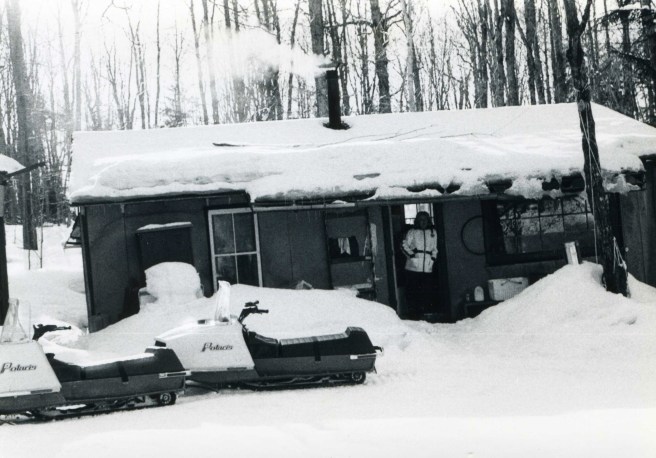
The new sleds are just plain ridiculous. They’re either one-person snow-cross machines with no protection or they’re giant behemoths with all the amenities of a Cadillac. Almost every model is $10k or more and the trail cruisers are all but gone. The new machines have almost no resemblance to the sleds of old, like the 1974 colts my parents bought and rode all over the adirondacks and to camp miles into the back country (pictured).

img4132

Our family has always stuck with Polaris and they’ve always been beautiful machines. That might need to change now. There’s no way I’m spending $10k on a snowmobile. Skidoo makes a nice 600 with a two-up seat, a larger windshield and better mileage for about $7k and even that seems ridiculous.

Family Portraits

Being the photographer of the family I’m rarely in the photos.  Someone needs to make a suggestion to get me into a photo before I’m in front of the lens or nobody knows I was ever there.  I don’t mind it but we’ve realized recently that we don’t really have enough pictures of us together so starting this month we’re going to make it a point to get at least one family photo a month.  It doesn’t have to be spectacular, just us.  Here’s our first attempt:

IMG_7787

Lilah has her typical “everything is amazing and surprising” look on her face, but not bad for a self-timed job with a 9-mo-old.